
This post is Part 2 of a series on user tracking on the web today. You can read Part 1 here and Part 3 here.
3rd party advertising and tracking firms are ubiquitous on the modern web. When you visit a webpage, there's a good chance that it contains tiny images or invisible JavaScript that exists for the sole purpose of tracking and recording your browsing habits. This sort of tracking is performed by many dozens of different firms. In this post, we're going to look at how this tracking occurs, and how it is being combined with data from accounts on social networking sites to build extensive, identified profiles of your online activity.
How 3rd parties get to see what you do on the web.
Let's start with an example of 3rd party tracking: when we went to CareerBuilder.com, which is the largest online jobs site in the United States, and searched for a job, CareerBuilder included JavaScript code from 10 (!) different tracking domains: Rubicon Project, AdSonar, Advertising.com, Tacoda.net (all three are divisions of AOL advertising), Quantcast, Pulse 360, Undertone, AdBureau (part of Microsoft Advertising), Traffic Marketplace, and DoubleClick (which is owned by Google). On other visits we've also seen CareerBuilder include tracking scripts and non-JavaScript web bugs from several other domains. There are pretty sound reasons to hope that when you search for a job online, that fact isn't broadcast to dozens of companies you've never heard of — but that's precisely what's happening here.
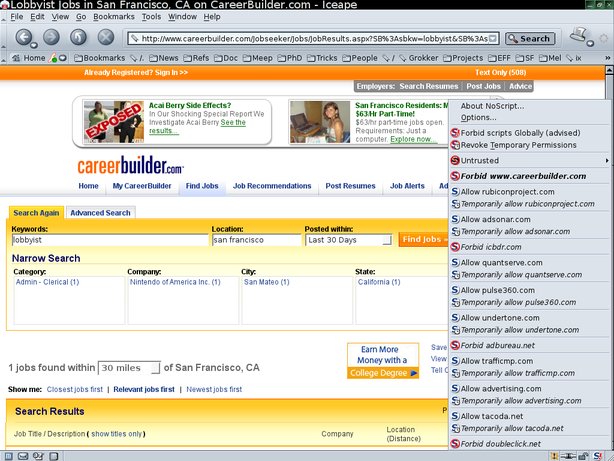
(in this screenshot, NoScript is being used to identify the third parties whose code is embedded in the page)
Each of these tracking companies can track you over multiple different websites, effectively following you as you browse the web. They use either cookies, or hard-to-delete "super cookies", or other means, to link their records of each new page they see you visit to their records of all the pages you've visited in the previous minutes, months and years. The widespread presence of 3rd party web bugs and tracking scripts on a large proportion of the sites on the Web means that these companies can build up a long term profile of most of the things we do with our web browsers.
They can track us, but do they know who we are?
Given how much tracking firms know about our browsing history, it's worth asking whether these companies also know who we are. The answer, unfortunately, appears to be "yes", at least for those of us who use social networking sites.
A recent research paper by Balachander Krishnamurthy and Craig Wills shows that social networking sites like Facebook, LinkedIn and MySpace are giving the hungry cloud of tracking companies an easy way to add your name, lists of friends, and other profile information to the records they already keep on you.
The main theme of the paper is that when you log in to a social networking site, the social network includes advertising and tracking code in such a way that the 3rd party can see which account on the social network is yours. They can then just go to your profile page, record its contents, and add them to their file. Of the 12 social networks surveyed in the paper, only one (Orkut) didn't leak any personally identifying information to 3rd parties.
There are some interesting technical details in how the social networking sites leak this data. In some cases, the leakage may be unintentional, but in others, there is clever and surreptitious anti-privacy engineering at work.
Paths for Data Leakage from Social Networks to 3rd party Tracking Firms
The most obvious way that a 3rd party tracker might learn which account on a social networking site is yours is via the HTTP Referrer header. A typical URL on a social networking site includes a username or user ID number, and any 3rd party will be able to see that.1
A second and slightly more revealing method that some social networks use to leak personal information is through URL/URI parameters for the 3rd party content. Here's an anonymized example from the paper:
GET /track/?...&fb_sig_time=1236041837.3573&
     fb_sig_user=123456789&...
Host: adtracker.socialmedia.com
Referer: http://apps.facebook.com/kick_ass/...
(In this request, a Facebook app is sending the user's facebook user ID and signin time to to adtracker.socialmedia.com)
The third and most surprising method for leaking personal information is to alias 3rd party tracking servers into the host site's domain name in such a way that the 3rd party can see the host site's cookies, in violation of the same origin policy. Here's an example from the paper:
GET /st?ad_type=iframe&age=29&gender=M&e=&zip=11301&...
Host: ad.hi5.com
Referer: http://www.hi5.com/friend/profile/displaySameProfile.do?userid=123456789
Cookie: LoginInfo=M_AD_MI_MS|US_0_11301; Userid=123456789;Email=jdoe@email.com;
(ad.hi5.com is actually ad.yieldmanager.com, and it's receiving different bits of personal information via referrer, URI parameters, and the hi5.com cookie which the same origin policy wouldn't have allowed it to have — so it's an example of all three leakage methods at once)
What can I do to protect myself?
Unfortunately, there is no easy way to use modern, cookie- and JavaScript-dependent websites and social networking sites and avoid tracking at the same time. In order to be substantially protected against these tracking mechanisms, you'd need to do the following:
- Pick a good cookie policy for your browser, like "only keep cookies until I close my browser", or manual approval of all cookies.
- Disable Flash Cookies and all the other kinds of "super cookies".
- Use the Firefox extensions RequestPolicy and NoScript to control when 3rd party sites can include content in your pages or run code in your browser, respectively. These tools are very effective, but be aware that they're hard to use: lots of sites that depend on JavaScript will need to be whitelisted before they work correctly.
- Use the Targeted Advertising Cookie Opt-Out plugin. This will automatically opt you out of any 3rd party trackers who have an opt out somewhere that requires you to accept a cookie. Be aware that not all 3rd parties will offer opt outs, or that some of them may interpret "opt out" to mean "do not show me targeted ads", rather than "do not track my behavior online".
- As always, it doesn't hurt to use Tor via TorButton to hide your IP address and other browser characteristics when you want maximal browser privacy.
Unfortunately, many of the steps above are quite difficult to follow, and we're fearful that the vast majority of Internet users will continue to be tracked by dozens of companies — companies they've never heard of, companies they have no relationship with, companies they would never choose to trust with their most private thoughts and reading habits.
It isn't going to be easy to fix this mess. On the technical side, all of this tracking follows from the design of the Web as an interactive hypertext system, combined with the fact that so many websites are willing to assist advertisers in tracking their visitors. Browsers could be altered to make them harder to track, but great care and clever design will be required to achieve that without undermining the virtues of interactive hypertext in the first place. It's not clear that anyone has found the right way to do that yet.
On the legal side, it's clear that the current U.S. privacy regime isn't working: behavioral tracking companies can put whatever they want in the fine print of their privacy policies, and few of the visitors to CareerBuilder or any other website will ever realize that the trackers are there, let alone read their policies. It's time we found legal rules to ensure that people actually know when their privacy is part of the price they pay to visit a site.
- 1. One subtlety here is that sometimes the 3rd party won't be able to tell whether a profile is yours or belongs to someone else. But there are several ways around that: they can look for URLs associated with profile editing or other activites that your friends can't do with to your profile; they can see which profile you visit first when you log in to the site, and they can see which profile you visit most often over time.